RDS Reboot IP Change: Does It Break Your App?
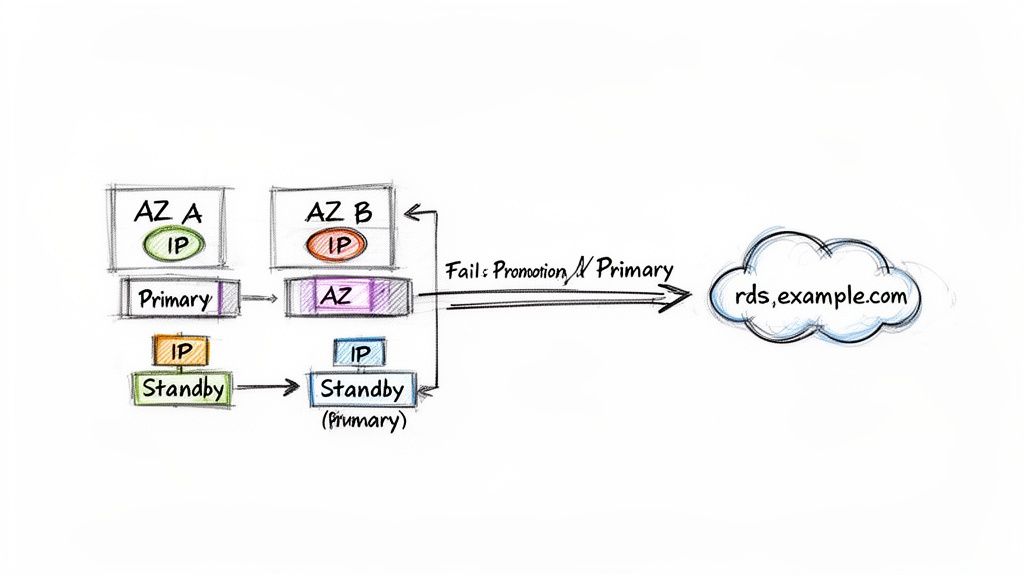
When you trigger an RDS reboot, whether the IP address changes really depends on your specific setup. If you're running a Multi-AZ instance and perform a reboot with failover, you can bet on getting a new IP address. In this scenario, traffic is rerouted to the standby instance, which resides in a completely different Availability Zone and has its own distinct IP. On the other hand, a simple reboot without failover on a Single-AZ instance usually keeps the same IP. However, "usually" isn't a guarantee you should build your critical infrastructure upon, as underlying host changes can still force an IP switch.
Automate Your RDS Reboots and Save on AWS Costs
Stop manually managing database reboots and start saving time and money. With Server Scheduler, you can easily automate start, stop, and reboot schedules for your RDS instances to cut cloud costs by up to 70%. Transform risky manual tasks into a predictable, cost-saving superpower.
Explore Server SchedulerContents
- Understanding Why RDS IP Addresses Change
- Making the DNS Endpoint Your Single Source of Truth
- Building a Resilient Architecture to Handle IP Changes
- Transforming Scheduled Reboots into a Cost-Saving Superpower
- How to Confidently Test Your Failover Process
- Frequently Asked Questions About RDS Reboots and IP Changes
- Related Articles
Ready to Slash Your AWS Costs?
Stop paying for idle resources. Server Scheduler automatically turns off your non-production servers when you're not using them.
Understanding Why RDS IP Addresses Change
At its core, Amazon RDS is designed for high availability, and this design philosophy is the exact reason you cannot rely on a static IP address. When you launch an RDS instance, AWS provides a DNS endpoint, not a fixed IP. This endpoint, which looks something like mydb.random-chars.us-east-1.rds.amazonaws.com, is a CNAME record. It serves as your single stable connection point for the database, a crucial feature for resilience. This DNS-based approach allows AWS to handle hardware failures, perform maintenance, or execute a failover without forcing you to reconfigure your entire application. The IP address itself is tied to the underlying EC2 instance running your database, and that virtual machine is ephemeral by nature.
Key Takeaway: The DNS Endpoint Is Permanent, The IP Is Not Always configure your applications to connect to the RDS DNS endpoint. Hardcoding an IP address is a recipe for an outage, because that underlying IP can and will change during events like failovers or host replacements.
The most common reason for an rds reboot ip change is a "reboot with failover" in a Multi-AZ deployment. The process is slick and automated. When a failover is triggered, either manually or due to a hardware issue, Amazon RDS instantly updates the CNAME record for your database endpoint. It stops pointing to the IP of the old primary and flips over to the IP of the standby instance. Concurrently, the standby instance, which has been replicating data in a separate Availability Zone with its own IP, is promoted to become the new primary. This entire transition typically completes in just a minute or two. For a deeper look at the mechanics, check out our guide on what happens when rebooting an RDS instance. This mechanism keeps your database online even when the original hardware fails.
Making the DNS Endpoint Your Single Source of Truth
Hardcoding an IP address directly into your application configuration is a recipe for disaster. It’s a surprisingly common mistake, but when it comes to Amazon RDS, the DNS endpoint is the only way to build a stable and resilient database connection. Think of this endpoint as the permanent address for a constantly moving target. This DNS record shields your application from the messy reality of an rds reboot ip change. It gracefully handles multi-AZ failovers, routine maintenance, and instance scaling, so your application always knows where to find the database. You wouldn't give someone the temporary hotel room number of a friend who's always traveling; you'd give them the friend's permanent phone number. The DNS endpoint is that reliable phone number for your database.
Even when using the DNS endpoint correctly, you might still see a brief connection delay after a failover. This is usually not an RDS problem but a fundamental aspect of how DNS works, specifically caching and Time-to-Live (TTL). The RDS endpoint typically has a very short TTL, often just five seconds, to facilitate quick changes. However, your own application servers, containers, or even the JVM might have their own DNS caching layers that don't respect such a short TTL. If your app’s DNS resolver stubbornly caches the old IP for 60 seconds, it will keep trying to connect to the failed instance for a full minute after the failover is complete. This can turn a 60-second RDS failover into a five-minute application outage.
Building a Resilient Architecture to Handle IP Changes
Knowing that an rds reboot ip change is a feature, not a bug, is half the battle. The next step is designing your application architecture to expect this behavior, making IP changes irrelevant to your day-to-day operations. A truly resilient setup uses layers of abstraction to shield your application from infrastructure shifts. This means looking beyond the default RDS endpoint to implement solutions that give you better control, connection pooling, and transparent failover handling. Adopting robust cloud-native architecture principles is key for long-term stability in a dynamic environment like AWS. A simple but effective first move is creating your own CNAME record in Amazon Route 53 that points to the AWS-provided RDS endpoint. Instead of hardcoding mydb.random-chars.region.rds.amazonaws.com, applications can connect to database.your-company.com, simplifying management and enhancing portability.
For applications demanding the highest levels of availability, Amazon RDS Proxy is a game-changer. It’s a fully managed database proxy that sits between your application and your RDS database. By pooling and managing connections, RDS Proxy can handle failovers seamlessly. When the primary database's IP changes, the proxy switches to the new primary in seconds, often without dropping your application's connection to the proxy itself. This makes the entire event almost invisible to your application and can reduce failover times significantly. In some complex architectures, a Network Load Balancer (NLB) might be considered to provide a static IP entry point, but this adds complexity and is generally reserved for legacy systems with specific requirements.

Comparing RDS IP Change Mitigation Strategies
| Strategy | How It Works | Best For | Key Benefit |
|---|---|---|---|
| Custom CNAME | A Route 53 CNAME record points to the RDS endpoint, abstracting it. | Most applications; simple setups. | Simplicity and portability. |
| RDS Proxy | A managed proxy pools connections and handles failovers transparently. | High-availability apps, microservices. | Dramatically reduced failover time. |
| Network Load Balancer | An NLB provides a static IP and routes TCP traffic. | Legacy systems requiring a fixed IP. | Static IP and protocol flexibility. |
Transforming Scheduled Reboots into a Cost-Saving Superpower
While an unplanned rds reboot ip change can feel like a crisis in production, scheduled reboots in non-production environments are a massive cost-saving opportunity. Every minute your development, staging, or QA databases are running, you're paying for them. For most teams, these instances sit idle overnight, on weekends, and during holidays, burning cash. Instead of dreading reboots, you can flip the script and turn them into a predictable, automated event that slashes waste from your AWS bill. By scheduling non-prod RDS instances to power down during off-hours, you stop paying for resources that nobody is using.
Automation is the key. Using a scheduling tool, you can set precise windows for your databases to shut down and start back up, such as powering down dev databases at 7 PM on weekdays and keeping them off until 7 AM the next morning. This approach takes the potential chaos of an IP change and turns it into a planned activity within a designated maintenance window. It's no surprise that reboot-induced IP changes have driven a significant rise in automation adoption. Unhandled IP shifts are a major headache, causing a large percentage of connection errors in production. AWS documentation on rebooting database instances here confirms that in a Multi-AZ setup, a failover automatically switches the IP to restore operations quickly. By automating, you not only optimize costs but also enforce operational hygiene, applying patches and updates during these scheduled windows.
How to Confidently Test Your Failover Process
A resilience strategy you haven't tested is just a theory. The only way to know for sure that your entire stack can handle an rds reboot ip change gracefully is to put it through its paces with controlled simulations. Proactively testing your failover process is a critical discipline for any team serious about high availability. Running 'fire drills' in a staging environment that mirrors production can uncover hidden issues like faulty connection strings or stubborn DNS caching. This is a core part of any robust Disaster Recovery Plan. Before you start, build a dedicated dashboard in Amazon CloudWatch to track key metrics like DatabaseConnections, CPUUtilization, and ReplicaLag, giving you a clear before-and-after picture.
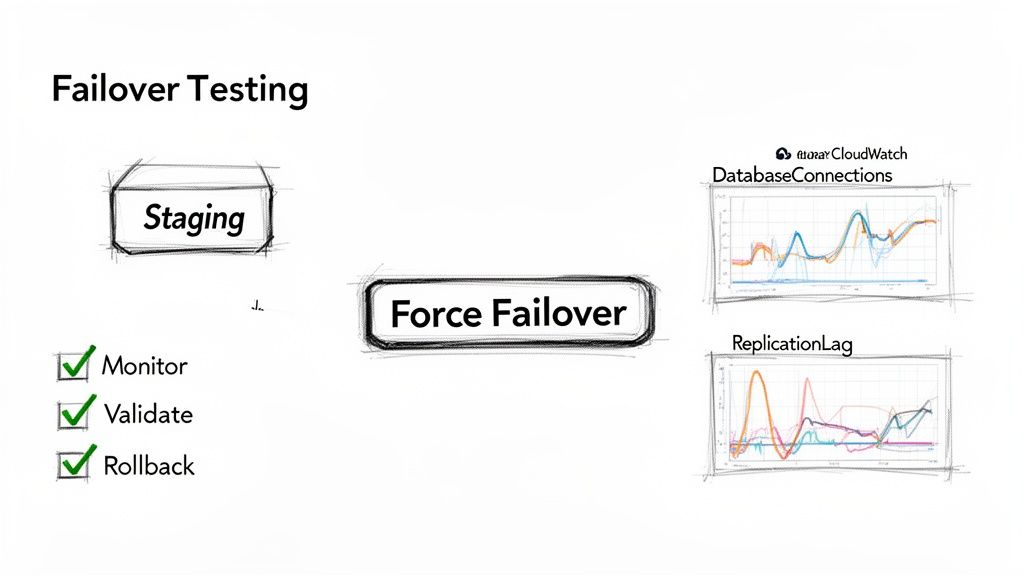
With monitoring in place, initiate a failover by rebooting your Multi-AZ instance with the "failover" option. As the test runs, watch your dashboard closely. Did DatabaseConnections drop and then recover within your expected timeframe? Did CPUUtilization spike and stay high? A successful test isn't one where nothing goes wrong; it's one that reveals a weakness in a safe environment, allowing you to fix it before it impacts real users. Afterward, analyze application logs for timeout errors or other signs of distress. The goal is to make the failover process so smooth that it becomes a non-event for your end-users.
Frequently Asked Questions About RDS Reboots and IP Changes
Working with RDS, you quickly learn that understanding the details of a reboot or failover is critical. Several common questions arise frequently, especially concerning how IP addresses behave. In a normal reboot, a Single-AZ instance will almost always keep its private IP address because the underlying hardware doesn't change. However, you cannot rely on this, as AWS maintenance or hardware issues can force your instance onto a new host, which will change the IP. The golden rule is to always use the DNS endpoint, as it is your only guarantee for a stable connection.
On the AWS side, the DNS update after a failover is incredibly quick, usually under 60 seconds. The real delay your application experiences is almost always caused by client-side DNS caching. RDS Proxy is valuable because it acts as a middleman, managing a warm pool of connections. When a failover occurs, the proxy handles the switch to the new primary, often so seamlessly that your application's connection to the proxy itself never drops. Finally, it's important to know that you cannot assign a static Elastic IP directly to an RDS instance. The correct pattern is to use the provided DNS endpoint or create your own CNAME record in Route 53 that points to the RDS endpoint for a more portable name.
Stop letting manual reboots and unpredictable IP changes disrupt your workflow. With Server Scheduler, you can automate your entire RDS fleet, turning risky manual tasks into a predictable, cost-saving superpower. Schedule your RDS reboots automatically with Server Scheduler.