Your Guide to AWS EC2 Scheduler Start Stop Automation
Let's be honest, uncontrolled cloud spend is a real problem. We've all seen it happen. Development, staging, and testing environments sit idle outside of business hours, silently racking up charges on the monthly AWS bill. A smart AWS EC2 scheduler start stop strategy isn't just a "nice-to-have"—it's an essential way to reclaim a huge chunk of your budget.
Contents
Ready to Slash Your AWS Costs?
Stop paying for idle resources. Server Scheduler automatically turns off your non-production servers when you're not using them.
Stop Paying for Idle EC2 Instances
The financial drain from letting non-production instances run 24/7 is easy to underestimate, but it's a massive source of cloud waste. These resources are critical for development and testing, sure, but they're typically only providing value during business hours. Putting these instances on an automated schedule is one of the most powerful levers you can pull to optimize your cloud spend. This isn't just theory; the numbers speak for themselves. Many teams are shocked when they see the savings from just scheduling EC2 instances to turn off outside of business hours. It’s a game-changer.
 cloud automation, where you replace manual, repetitive work with automated workflows to boost efficiency.
To put this into perspective, let's look at what this means for some common EC2 instance types. The table below shows the potential savings when moving from a 24/7 schedule to a much more reasonable 50-hour work week. As you can see, the savings are significant. By adopting an automated schedule, you're turning a fixed operational cost into a variable one that actually reflects how your team works. That's money you can put back into innovation and other strategic projects.
| Instance Type | Approx. Monthly Cost (24/7) | Approx. Monthly Cost (50 hrs/week) | Estimated Monthly Savings | Estimated % Savings |
|---|---|---|---|---|
| t3.large | $61 | $18 | $43 | ~70% |
| m5.large | $70 | $21 | $49 | ~70% |
| c5.large | $62 | $18 | $44 | ~71% |
| r5.large | $92 | $27 | $65 | ~71% |
Costs are approximate, based on us-east-1 On-Demand pricing, and may vary.
Building Your Own Scheduler with Lambda and EventBridge
For teams who like to get their hands dirty and want full control, building your own AWS EC2 scheduler start stop solution with native AWS services is a solid option. This serverless approach combines AWS Lambda for running your code and Amazon EventBridge to kick things off. The result is a flexible, scalable system that doesn't require you to manage a single server. The basic idea is straightforward. You create two separate Lambda functions: one to start your EC2 instances and another to shut them down. These functions, usually written in Python or Node.js, use the AWS SDK to interact with the EC2 API.
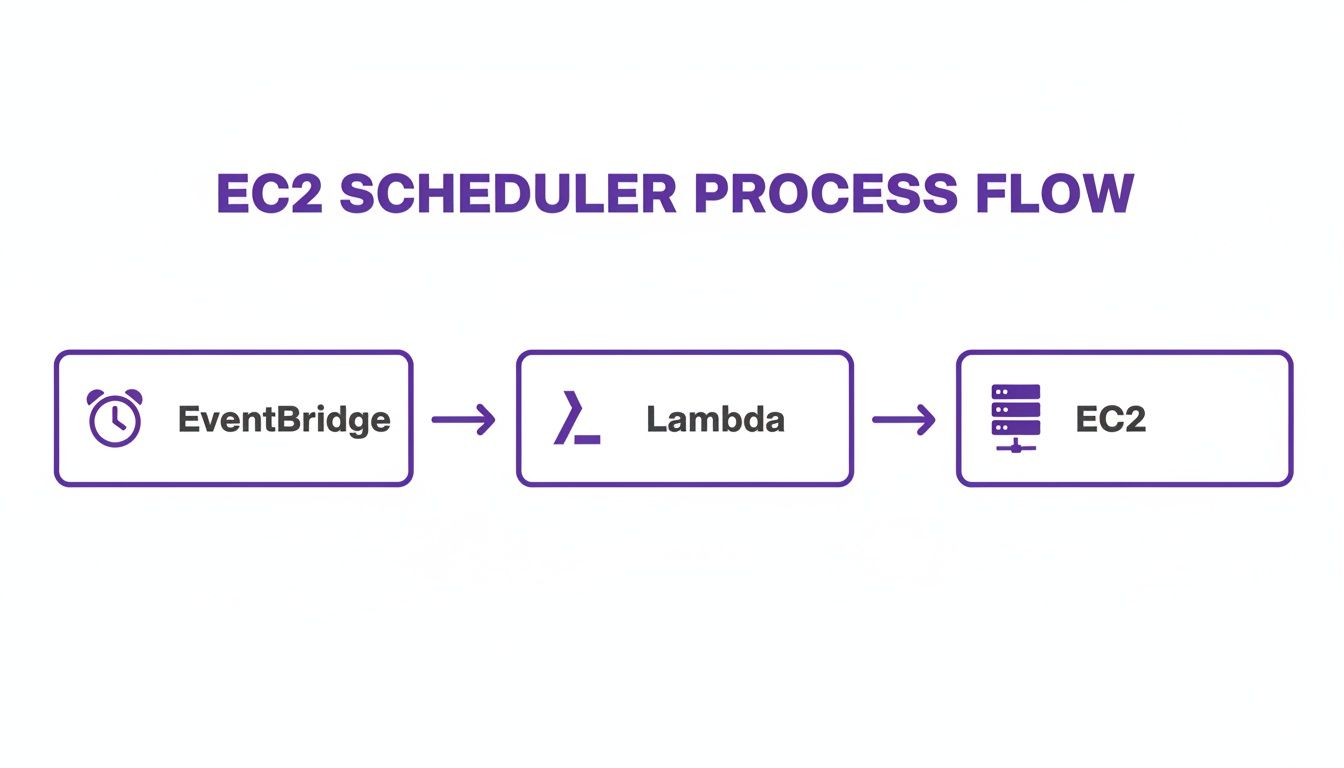
Security is paramount, so each Lambda function needs its own tightly-scoped IAM role. By adhering to the principle of least privilege, you grant only the absolute minimum permissions required. The ec2:StartInstances permission is for the start function, and ec2:StopInstances is for the stop function. Both roles also need basic permissions for CloudWatch Logs to aid in debugging. With Amazon EventBridge, you can set up rules that trigger your Lambda functions on a recurring schedule using standard cron expressions, giving you fine-grained control over when your instances power on and off.
To make your scheduler truly useful and scalable, you absolutely have to use resource tags. Hardcoding instance IDs into your Lambda functions is a maintenance nightmare. Instead, write your functions to find instances based on a specific tag, such as Schedule:OfficeHours. This strategy is a game-changer because it makes the system scalable, maintainable, and flexible. Adding a new instance to the schedule is as easy as applying the right tag—no code changes needed. For a deeper look, check out our guide on creating a simple AWS EC2 start stop schedule.
 Using the Official AWS Instance Scheduler Solution
If a fully custom Lambda setup feels like overkill but you still want a native AWS solution, the official AWS Instance Scheduler is a fantastic middle ground. This is a pre-packaged solution you deploy with a CloudFormation template, automatically wiring up Lambda, DynamoDB, and CloudWatch. It provides a robust, tag-based scheduling system right out of the box, taking the guesswork out of building a scheduler from scratch while still allowing for customization.
The system operates by storing your schedules as items in a DynamoDB table. A CloudWatch rule then periodically triggers a Lambda function, which scans your environment for resources with a specific tag. The function checks that tag against the schedules in DynamoDB and then performs the start or stop action. It's an incredibly effective way to manage not just EC2 instances but also your RDS databases across your entire fleet. At its heart is the DynamoDB configuration table where you define schedules with names like 'london-office-hours'. Each schedule consists of periods specifying begin/end times, weekdays, and timezones, enabling complex rules for different teams without touching code.
While powerful, this solution introduces its own operational overhead. Managing the DynamoDB table and handling CloudFormation stack updates for new features or bug fixes are additional tasks for your team. The official Instance Scheduler is great for enterprise-scale operations, as it can operate across Regions and accounts and includes a CLI for configuration. However, this can add a layer of complexity for smaller teams. You can learn more about the official solution's architecture and capabilities to see if it's the right fit, or read our breakdown of the EC2 Instance Scheduler.
Choosing the Right EC2 Scheduling Method for Your Team
With several options on the table, figuring out the best aws ec2 scheduler start stop strategy can feel a bit overwhelming. The right choice really boils down to your team's size, technical expertise, and specific needs. A small startup might get by just fine with a custom Lambda script, while a global enterprise will need something far more robust to handle complexity. Let's break down the three main approaches: building your own solution, deploying the official AWS Instance Scheduler, or using a dedicated third-party tool like Server Scheduler.
Each path comes with its own set of trade-offs around setup, ongoing maintenance, and available features. Setting up an EC2 scheduler is a huge part of effective software resource planning, which focuses on getting the most out of your IT assets. The best scheduler is one that fits seamlessly into your existing workflow. A tool that requires constant manual intervention will quickly become more trouble than it's worth. This table provides a quick comparison.
| Feature | Lambda + EventBridge | AWS Instance Scheduler | Third-Party Tool |
|---|---|---|---|
| Ease of Setup | Moderate (requires coding) | High (CloudFormation deploy) | Very High (GUI-based) |
| Maintenance | High (code, IAM, updates) | Moderate (stack updates) | Low (fully managed) |
| Scalability | High (with good design) | Very High | Very High |
| Timezone Handling | Manual (code logic needed) | Built-in (DynamoDB config) | Built-in & User-friendly |
| User Interface | None (code/CLI only) | None (DynamoDB/CLI) | Yes (visual time grid) |
| Cost | Near-zero (Lambda free tier) | Low (services usage) | Subscription-based |
For a small, tech-savvy team, the Lambda + EventBridge approach is tough to beat on cost, offering ultimate control. The catch is that you’re on the hook for all maintenance. The AWS Instance Scheduler is a powerful middle ground, handling complex scenarios out of the box but lacking a user-friendly interface. Finally, a third-party tool like Server Scheduler is built for teams who value ease of use and operational efficiency, removing the maintenance headache entirely.
Best Practices for Smart Instance Scheduling
Putting an aws ec2 scheduler start stop solution in place is a great start, but a smart strategy is what really unlocks maximum savings without tripping up your teams. The cornerstone of any good scheduling system is a consistent, well-documented tagging strategy. Get this wrong, and your automation will be brittle and a nightmare to scale. Tags are how your scheduler knows which instances to touch, making them the central nervous system of your setup. Inconsistent tags are where things fall apart. To sidestep this, establish and enforce a clear naming convention, such as schedule:{region}-{description}, using lowercase and hyphens.
Another critical practice is handling stateful applications gracefully. Just pulling the plug on an instance with a database or an in-memory cache is asking for trouble. It can lead to data corruption or long startup times. These apps need a graceful shutdown sequence to save their state to disk. It's crucial to ensure your scheduling logic includes pre-stop scripts or hooks that allow applications to shut down cleanly. Using AWS Systems Manager Run Command to execute a shutdown script before the stop action is a common and effective method.
Finally, you must implement robust monitoring and alerting. What happens when a schedule fails? An instance that was supposed to shut down might run all weekend, wiping out your savings. You must set up monitoring to catch these failures. Using Amazon CloudWatch, you can create alarms that fire if the scheduler logs an error or if a scheduled execution is missed. Pipe these alerts to an SNS topic that notifies your operations team through Slack or email. Proactive monitoring turns a silent, costly failure into an actionable ticket. For more tips, see our guide on AWS cost optimization best practices.
Common Questions About EC2 Scheduling
As you explore an aws ec2 scheduler start stop strategy, a few common questions always come up. Getting clear answers is key to building a solution that works for your team. An EC2 scheduler is an automation tool that programmatically starts and stops your Amazon EC2 instances based on a defined schedule. Instead of letting instances run 24/7, a scheduler ensures they are only active when needed, like during business hours. This practice is one of the most effective ways to cut cloud waste and lower your AWS bill, often saving 70% or more on non-production workloads.
It's crucial to distinguish between the general practice of scheduling and the specific AWS service called Scheduled Instances. This is a purchasing option that lets you reserve capacity for EC2 instances on a recurring schedule, but it requires a one-year commitment. For most teams, a more flexible approach using tags, a custom Lambda function, or a third-party tool is far more practical. Our guide on how to automatically start and stop EC2 instances covers these options.
A good scheduler should absolutely manage RDS instances, too. Just like EC2, non-production RDS instances are a significant source of unnecessary cloud spend. Both the official AWS Instance Scheduler and third-party tools like Server Scheduler support RDS scheduling, allowing you to apply the same cost-saving logic to your entire non-production stack. Timezone management is another make-or-break feature, especially for distributed teams. A robust solution must be timezone-aware, allowing you to define a schedule like "9 AM to 5 PM" and lock it to a specific timezone, ensuring it aligns with local working hours.
Related Articles
- AWS Cost Optimization Best Practices to Slash Your Cloud Spend
- A Simple Guide to Automatically Start and Stop EC2 Instances
- How to Create a Simple AWS EC2 Start Stop Schedule
Ready to stop paying for servers you're not even using? Server Scheduler gives you a simple, point-and-click way to automate your EC2 start/stop schedules and slash costs by up to 70%. Learn more and get started today!