AWS Cost Reduction Tools: 10 Options Compared for 2026
Compare 10 AWS cost reduction tools for scheduling, rightsizing, and billing analysis. See pricing, savings caveats, pros, cons, and the best use case for each.
Read More →
You've probably seen the failure pattern: an API accepts a large batch of work, then every downstream service tries to process it immediately. A slow dependency creates timeouts, retries multiply requests, and a deployment leaves unfinished work in an uncertain state. An Azure message queue gives those services a durable handoff, so producers can finish quickly while workers process tasks at a sustainable pace.
If you're designing scheduled jobs, background processing, or cloud operations, use this guide to choose the right Azure messaging primitive and avoid payload decisions that increase cost and latency.
Stop paying for idle resources. Server Scheduler automatically turns off your non-production servers when you're not using them.
A customer submits an image-processing request. The web API validates it, stores the file, calls a worker, waits for resizing and thumbnail generation, and finally returns a response. If the worker is busy or unavailable, the request becomes fragile. The user sees a timeout even though the work could have completed later.
A queue changes the relationship. The API places a compact job message into storage and returns, while a worker claims the message when it has capacity. That buffer absorbs bursts, separates deployment schedules, and gives operators a visible place to inspect pending work. It also supports the broader principle of cloud infrastructure, where independently managed components cooperate without requiring every request to complete synchronously.
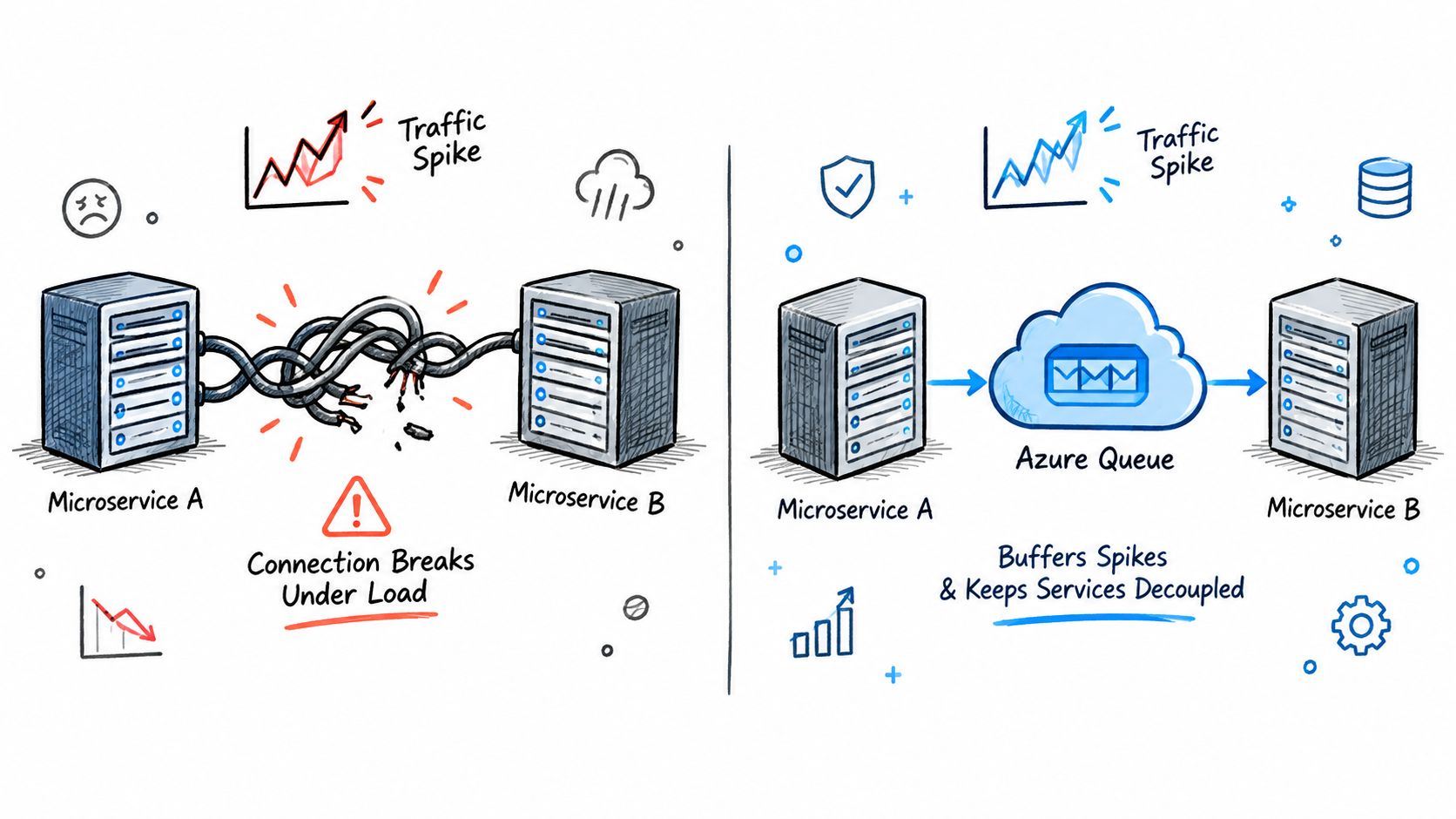
A queue primarily handles four responsibilities:
Azure Queue Storage is Microsoft Azure's message-queue service for storing large numbers of messages. Each message can be up to 64 KB, queues can contain an unlimited number of messages, and clients can access the service globally over HTTP or HTTPS, as documented in Microsoft's Queue service REST API.
Server Scheduler thinking is similar: scheduled operations become explicit tasks rather than late-night manual actions. The same discipline applies here. Define the work, record its state, and let a reliable executor handle it. The rest of this article focuses on the decision that often causes the most rework, what belongs inside the message and what belongs elsewhere.
Asynchronous messaging means the sender hands work to an intermediary instead of waiting for the receiver to finish. Think of a post-office line. One person deposits an envelope, and one available clerk processes it. That's a queue, where each message represents work for a consumer.
A topic works more like mail sorting. One publication can be routed to multiple subscriptions, so billing, fulfillment, and notifications can each receive a suitable copy. An event router is closer to a radio broadcast, where an occurrence is announced to interested handlers rather than assigned as a command to one worker.
Key definition: Asynchronous messaging separates the act of submitting work from the act of completing work.
Most queue designs should assume that a message can be delivered more than once. Consumers therefore need idempotent handlers, such as checking an operation ID before charging a customer or generating a duplicate export. “Exactly once” is usually a business outcome that the application protects through deduplication and state checks, not a reason to skip those safeguards.
Ordering matters when related messages change the same entity. Azure Service Bus sessions support ordered handling, and a queue can guarantee first-in-first-out delivery for messages in the same session, according to session guidance. Without that requirement, independent workers can often process messages concurrently.
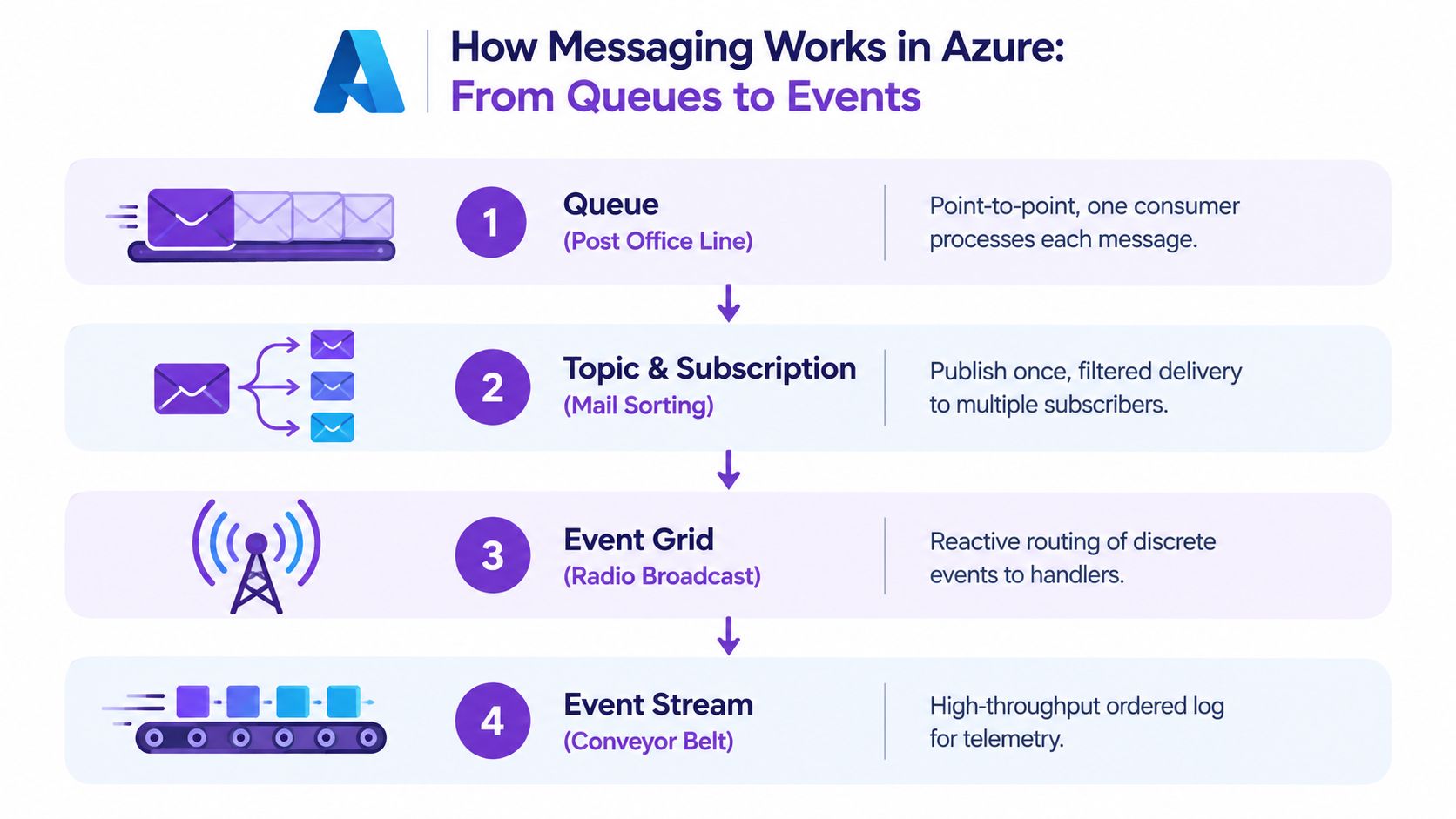
Polling means a consumer asks whether work is available. Push delivery means the platform invokes or notifies a handler. Neither model removes the need for retries, poison-message handling, and observability. Teams operating across environments can apply the same principles described in hybrid cloud operations, keeping handoffs explicit even when infrastructure differs.
Azure Queue Storage is the straightforward option for background tasks and large message collections. Service Bus queues fit workflows that need richer messaging semantics, such as sessions, topics, subscriptions, or duplicate detection.
Microsoft documents that Queue Storage messages are capped at 64 KiB, while Service Bus Standard and Basic tiers allow up to 256 KB per message. Premium Service Bus supports up to 100 MB over AMQP, but HTTP and SBMP remain limited to 1 MB, and messages above the applicable limit are rejected. See the Service Bus quotas before selecting a protocol.
| Capability | Azure Queue Storage | Azure Service Bus Queues |
|---|---|---|
| Best fit | Simple background work | Enterprise workflows and advanced routing |
| Message size | Up to 64 KiB | Up to 256 KB in Basic and Standard, larger Premium limit over AMQP |
| Ordering | Don't assume strict global FIFO | FIFO for related messages with sessions |
| Duplicate handling | Application-managed | Configurable duplicate detection |
| Access model | HTTP or HTTPS globally | AMQP and supported protocols with tier limits |
| Queue scale | Unlimited messages | Tier and namespace quotas apply |
Service Bus duplicate detection keeps message IDs for a configurable window. Microsoft documents a 10-minute default for queues and topics, a 20-second minimum, and a 7-day maximum in the duplicate detection documentation. A separate enablement guide describes the behavior as exactly-once delivery over the configured span.
Choose Queue Storage for a durable work list. Choose Service Bus when delivery behavior is part of the workflow contract.
The tradeoff affects FinOps as well as application design. Teams comparing cloud platforms can use a cloud cost comparison tool, but message size still needs architectural review. A service that meets feature requirements can remain expensive if every message carries bulky data.
Event Hubs is a stream, not a conventional command queue. It suits telemetry and other continuous records that consumers read as an ordered log within their stream design. A worker typically needs to acknowledge a command individually, while a stream consumer tracks progress through a sequence of events.
Event Grid serves a different purpose again. It routes discrete events to interested handlers, such as “a resource changed” or “a file arrived.” It's useful for reactive integration, but it isn't the natural choice for a long-running command that must wait in a work list until a specific worker completes it.
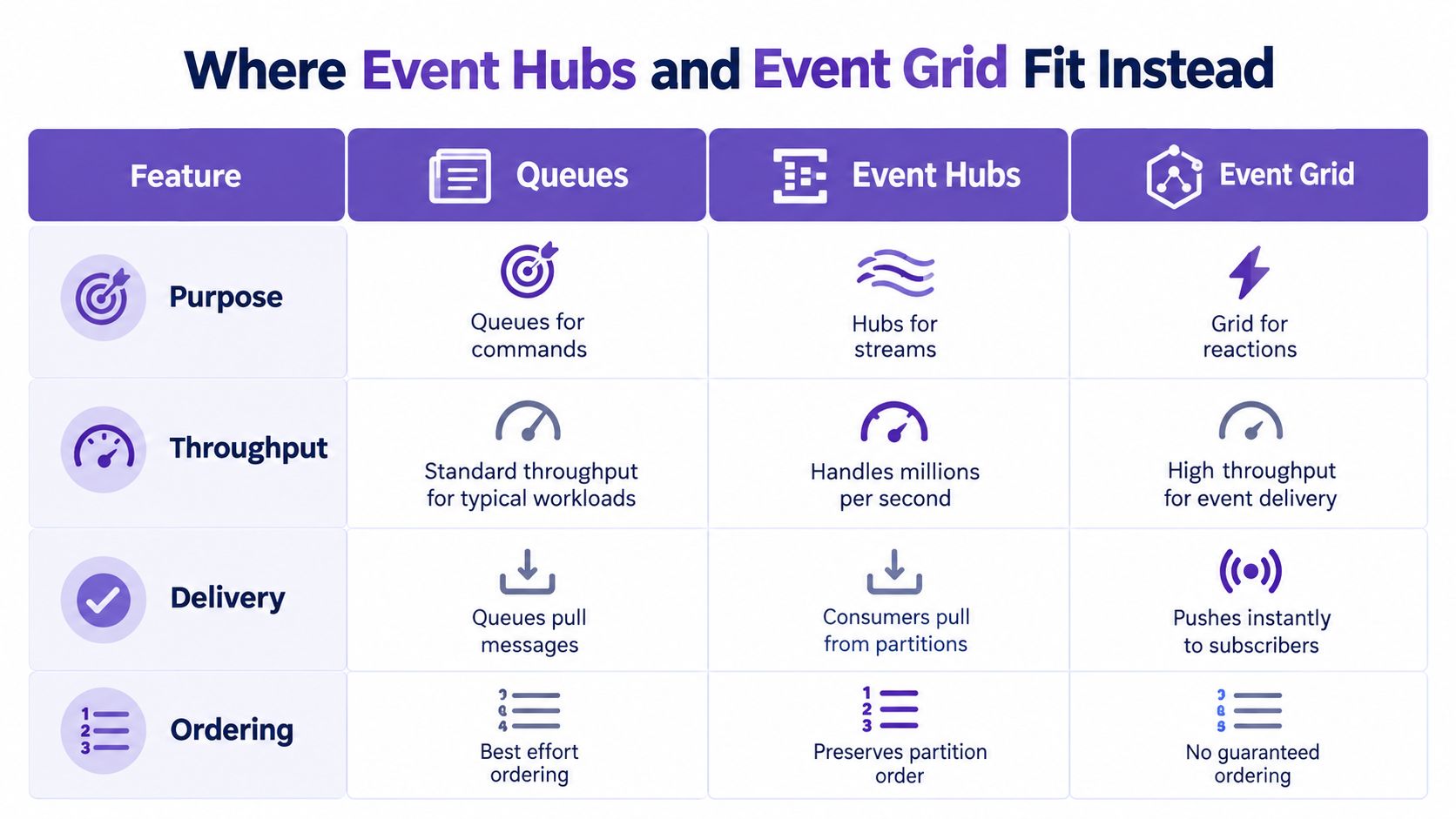
| Need | Better fit | Reason |
|---|---|---|
| One worker should process a task | Queue | Point-to-point work ownership |
| Many consumers need an occurrence | Event Grid or Service Bus topic | Distribution rather than exclusive work |
| Continuous telemetry | Event Hubs | Stream-oriented consumption |
| Related commands need sequence | Service Bus sessions | Ordered handling within a session |
A useful hybrid design sends application commands to a queue, while operational telemetry goes to Event Hubs. Event Grid can notify a workflow that a blob or resource changed, and that workflow can then enqueue a task for controlled processing.
The common mistake is treating every message as the same kind of thing. An event announces that something happened. A command asks a worker to do something. A stream preserves a sequence for continued consumption. Naming that intent first prevents an expensive service mismatch.
Payload design often matters more than the Storage Queue versus Service Bus label. Azure Queue Storage stops accepting a message above 64 KiB, while Service Bus billing uses 64 KB frames, so a 96 KB message counts as two billable operations, as Microsoft explains in its quota guidance.
Service Bus throughput is measured in bytes, not merely message count. Microsoft's performance guidance reports approximately 4 MB/second per Messaging Unit for ingress and egress, and notes that large messages reduce throughput while increasing latency. Read the Service Bus performance guidance when estimating capacity.
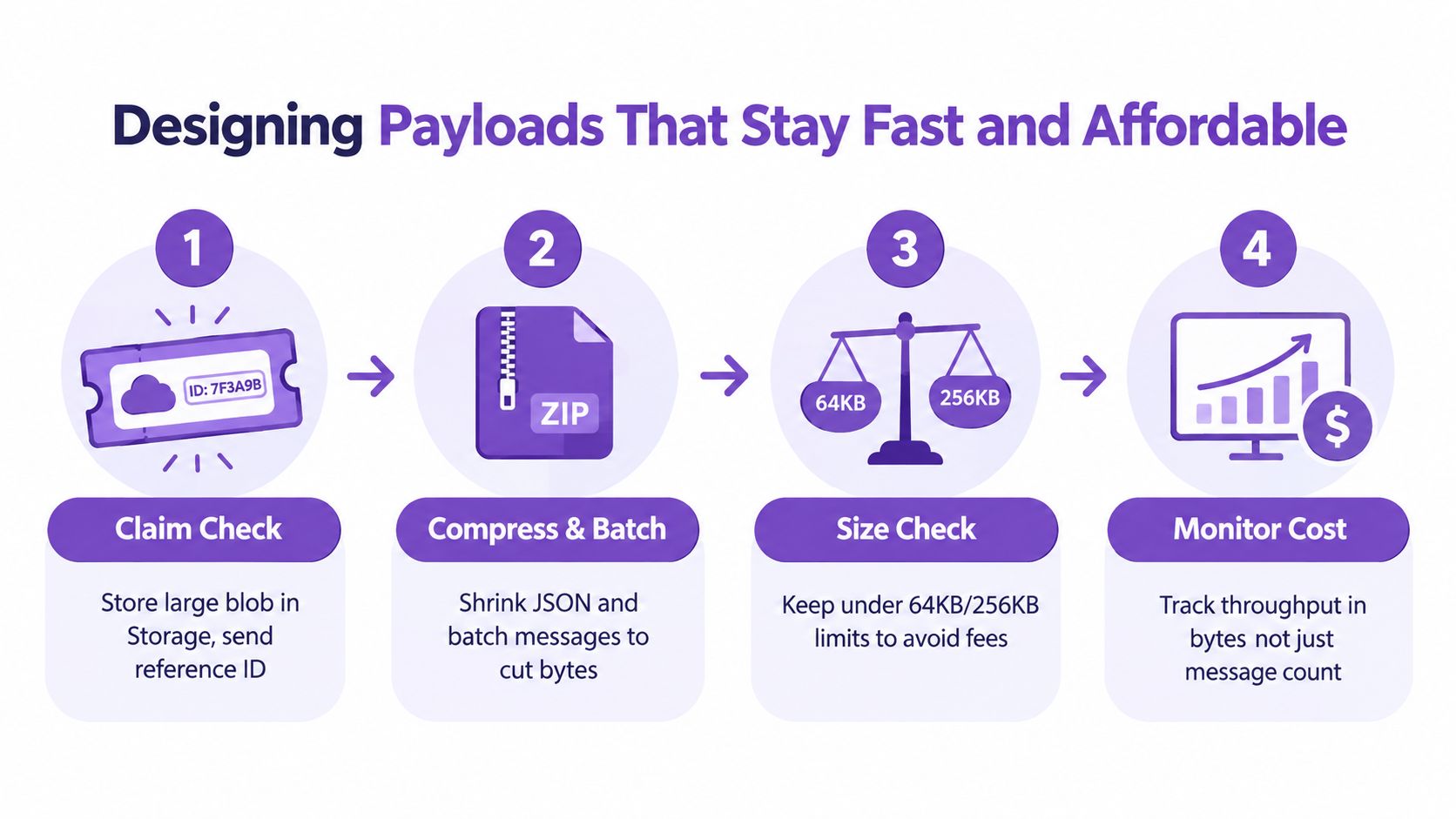
Use a simple decision path:
That claim-check pattern keeps the queue message compact, but it introduces consistency work. The producer must ensure the blob exists before publishing the reference, and the consumer needs a clear policy for missing or expired blobs. Include enough metadata to retry safely, but don't copy the payload into both locations.
Practical rule: Keep the message as a durable instruction, not a second database.
A payload review should therefore happen alongside operational cost reduction. Measure bytes, serialization overhead, retries, and storage access together. The smallest message isn't automatically the best message if it forces excessive round trips, but bulky JSON should never be the default.
A decoupled web worker begins with an API that accepts a request and writes a job message. An Azure Function or container worker reads the message, processes the referenced object, and records completion. If the handler fails, it should throw or otherwise leave the task available for retry, while a poison-message path gives operators a place to inspect malformed work.
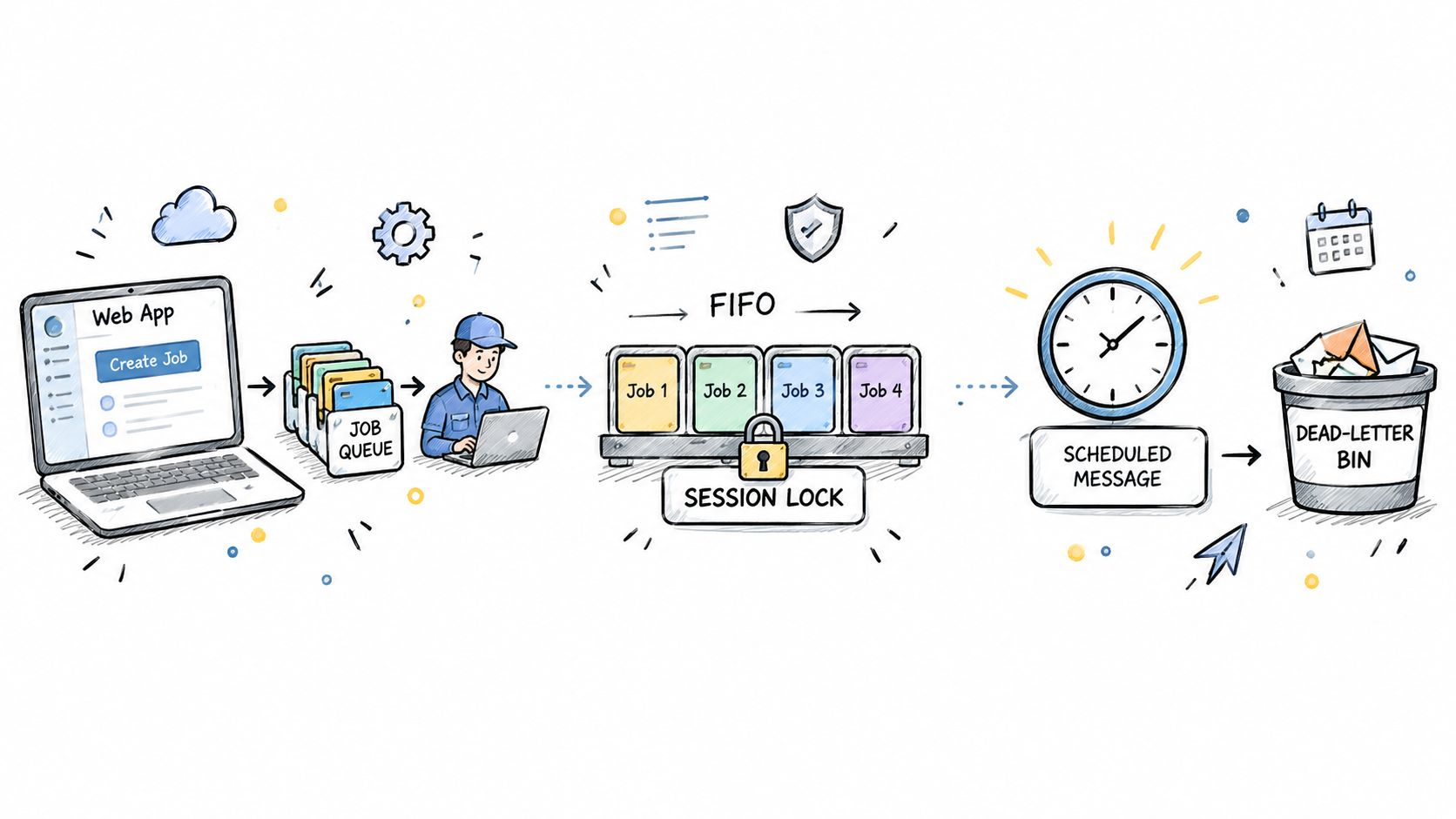
A second pattern uses Service Bus sessions for account-specific or order-specific work. Assign related messages the same session identifier, then process that session serially while allowing unrelated sessions to proceed independently. This preserves sequence where the business needs it without forcing every task into one global line.
A third pattern handles scheduled automation. A scheduler publishes a maintenance job, a worker performs it, and failures move into an operational review path rather than disappearing inside a script. TTL should match the usefulness of the task. Azure Queue Storage changed its message expiration behavior with service version 2017-07-29. Before that version, maximum TTL was seven days; that version and later support any positive TTL or -1 for messages that never expire, according to Microsoft's Queue Storage introduction.
For teams assessing broader workflow investments, this queue-based separation also provides useful context for integration ROI for scale-ups. The architecture earns its keep when it reduces coupling without hiding state from operators.
Start with identity and network boundaries. Prefer managed identity and least-privilege Azure RBAC where supported, and use private endpoints when your environment requires private network access. Keep secrets out of message bodies, and treat every payload as data that may appear in logs or debugging tools.
Monitoring needs context. Queue Storage's QueueMessageCount metric is refreshed daily, so it isn't a real-time backlog alarm. Pair it with worker telemetry, processing age, failure counts, and application-level latency before deciding that a queue is healthy. Microsoft describes this metric behavior in its Queue Storage introduction.
Use this decision checklist:
Document TTL, retry behavior, idempotency, payload size, and ownership before production. Governance reviews should also cover naming, access, retention, and cost visibility, using principles from infrastructure governance.
Server Scheduler helps teams automate predictable infrastructure operations with visual schedules instead of fragile scripts, making it a useful companion to queue-driven maintenance workflows. Visit Server Scheduler to define reliable server, database, and cache schedules and reduce the manual work around cloud operations.
Compare 10 AWS cost reduction tools for scheduling, rightsizing, and billing analysis. See pricing, savings caveats, pros, cons, and the best use case for each.
Read More →Find the best AWS service for cost optimization with 10 practical tools, native features, trade-offs, and use cases.
Read More →Understand cloud infrastructure cost drivers, measurement methods, and proven optimization strategies. A practical guide to FinOps governance and scheduling.
Read More →