AWS Cost Reduction Tools: 10 Options Compared for 2026
Compare 10 AWS cost reduction tools for scheduling, rightsizing, and billing analysis. See pricing, savings caveats, pros, cons, and the best use case for each.
Read More →
meta_title: How to Join 3 Tables in SQL Without Query Mistakes meta_description: Learn how to join 3 tables in SQL without duplicate rows or broken LEFT JOIN logic. Clear examples, fixes, and debugging steps for developers. reading_time: 8 minutes
You're probably here because your first three-table query looked fine, ran fine, and then returned numbers that made no sense. A customer list turned into duplicates, totals jumped, or a LEFT JOIN stopped preserving the rows you thought you were keeping. That's the lesson in how to join 3 tables in SQL. The syntax is easy. The mistakes are in the relationships.
Stop paying for idle resources. Server Scheduler automatically turns off your non-production servers when you're not using them.
A clean starting example is customers, orders, and order_items. customers holds the customer record, orders links back to the customer through customer_id, and order_items links to each order through order_id.
Here's the basic shape:
SELECT
  c.customer_id,
  c.name,
  o.order_id,
  oi.product_id,
  oi.quantity
FROM customers c
INNER JOIN orders o
  ON c.customer_id = o.customer_id
INNER JOIN order_items oi
  ON o.order_id = oi.order_id;
The important habit is reading each ON clause as a relationship between two tables only. One condition connects customers to orders. The next connects orders to order_items. SAS documentation states that a three-way joined query uses two join conditions, and it also notes that parentheses can control evaluation order when needed in joined tables (SAS joined tables documentation).
Most developers see “three-table join” and treat it like one big blob. Don't. Think of it as two linked joins chained together.
If you use AI to draft SQL, review matters. I like SpecStory, Inc.'s approach to AI coding because it pushes the workflow toward explaining intent, not just generating syntax. That matters when the query is technically valid but logically wrong.
Practical rule: If you can't explain what each
ONclause is doing in one sentence, don't run the query yet.
Mentally execute the query before touching production data. One customer can have many orders, and one order can have many items, so your result set will usually return one row per order item, not one row per customer and not one row per order. That row-level expectation becomes your baseline for spotting trouble later.
You write a three-table query, run it, and the row count jumps. Nothing failed. The SQL is valid. But the result is wrong because the query walked through the schema in the wrong direction.
A bad join path is one of the fastest ways to create silent duplicates. As noted earlier, SQL guides warn that tables often relate through an intermediate table, and skipping that table changes the meaning of the result. The usual reaction is to add DISTINCT. That hides the symptom. It does not fix the relationship problem.
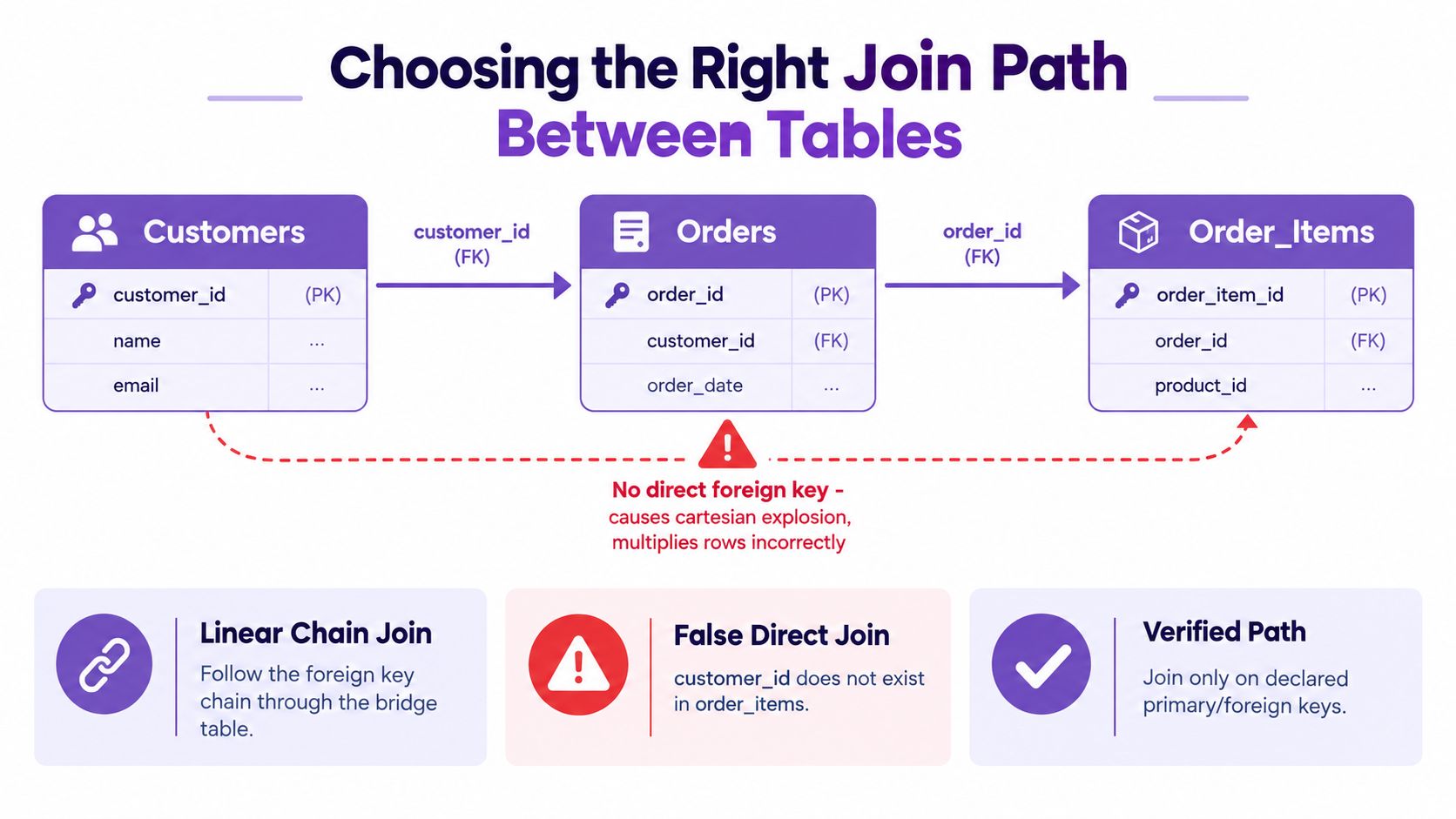
Here is the mistake new query authors make. They see customers and order_items, know those concepts are related in the business, and try to join them directly.
, Broken idea
SELECT c.name, oi.product_id
FROM customers c
INNER JOIN order_items oi
  ON c.customer_id = oi.customer_id;
That query is suspect even before you run it. order_items usually belongs to an order, not directly to a customer. The relationship chain is customer to order, then order to item. If you skip orders, you lose the table that defines which order each item came from. That is the exact point where row counts can multiply in ways that look random during debugging.
A three-table join works like following a train route with one transfer. If you skip the transfer station and draw your own line between the start and end, you are no longer following the map. You are inventing a path.
The correct path is indirect:
SELECT c.name, o.order_id, oi.product_id
FROM customers c
INNER JOIN orders o
  ON c.customer_id = o.customer_id
INNER JOIN order_items oi
  ON o.order_id = oi.order_id;
Now each ON clause matches the ownership path in the schema. orders is the bridge between the customer and the item.
This is also where developers answer the first practical question they ask after their first three-table query: why did my row count suddenly double? Usually, the query changed grain without the developer noticing. customers has one row per customer. orders has one row per order. order_items has one row per item on an order. Once you join all three, your result is often at item grain. One customer with two orders and three items across those orders becomes three rows, not one.
Use this check before you trust the output: state the expected row grain in one sentence. If you cannot say whether the final result should be one row per customer, per order, or per order item, the join path is still unclear.
For teams tracking schema drift and changing foreign key relationships over time, database lifecycle management practices help keep these join paths accurate as systems change.
Join through the table that owns the relationship. If two tables are related only through a third table, include that bridge instead of forcing a direct match.
This one catches people constantly. You write a LEFT JOIN because you want all customers, including customers with no orders. Then you add an INNER JOIN to order_items, and the unmatched customers disappear.
Several instructional sources now warn that LEFT JOIN followed by INNER JOIN can remove the rows the left join was meant to preserve, especially when you need optional child data across multiple tables (SQL Practice on multiple table joins).
Broken version:
SELECT c.name, o.order_id, oi.product_id
FROM customers c
LEFT JOIN orders o
  ON c.customer_id = o.customer_id
INNER JOIN order_items oi
  ON o.order_id = oi.order_id;
The LEFT JOIN keeps customers without orders. But the next join requires a matching order_items row. A customer without an order can't satisfy that condition, so the row gets filtered out anyway.
Fixed version:
WITH order_item_rows AS (
  SELECT o.customer_id, o.order_id, oi.product_id
  FROM orders o
  INNER JOIN order_items oi
    ON o.order_id = oi.order_id
)
SELECT c.name, r.order_id, r.product_id
FROM customers c
LEFT JOIN order_item_rows r
ON c.customer_id = r.customer_id;| Pattern | Join Order | Customers Without Orders | Typical Use Case |
|---|---|---|---|
| Broken query | customers LEFT JOIN orders, then INNER JOIN order_items |
Dropped | Accidental logic loss |
| Fixed query | orders INNER JOIN order_items inside CTE, then LEFT JOIN to customers |
Preserved | Reporting from a base customer list |
A
LEFT JOINis only as protective as the joins that come after it.
You write a three-table join, add COUNT(*), and your customer totals suddenly jump. The join is still valid. Your counting logic is not.
That usually happens because customers -> orders -> order_items changes the grain of the result. One customer can have many orders. One order can have many items. By the time order_items is in the query, each row usually represents an item, not a customer or even an order. If you aggregate at the wrong level, row counts grow and totals look believable.
WITH joined_sales AS (
  SELECT
    c.customer_id,
    c.name,
    o.order_id,
    oi.quantity
  FROM customers c
  INNER JOIN orders o
    ON c.customer_id = o.customer_id
  INNER JOIN order_items oi
    ON o.order_id = oi.order_id
)
SELECT
  customer_id,
  name,
  COUNT(DISTINCT order_id) AS order_count,
  SUM(quantity) AS total_items
FROM joined_sales
GROUP BY customer_id, name;
This pattern separates two jobs. First, create the row set. Then aggregate it. That split makes it much easier to answer the first question developers ask after their first three-table query: why did my row count suddenly double?
A quick way to reason about it is to ask, "What does one row mean right now?" In the CTE above, one row means one order item tied to one order and one customer. Once you say that out loud, COUNT(*) stops looking like "number of orders" and starts looking like "number of item rows."
COUNT(DISTINCT order_id) works here because you want orders, but the joined rows are items. SUM(quantity) also works because quantity belongs at the item level. If you were summing order_total from the orders table in this same joined set, each order total would repeat once per item and your revenue would inflate.
Date filters can make this harder to spot. If your reporting window is based on order dates or shipment dates, apply those conditions carefully and verify the grain you are filtering on. For a practical refresher, see how to compare dates in SQL for reporting filters.
| Aggregation | What it really counts on joined rows | Where it goes wrong | Safer pattern |
|---|---|---|---|
COUNT(*) |
Every customer-order-item row | You meant orders or customers | Count the entity key you actually mean |
COUNT(DISTINCT order_id) |
Unique orders | You need item counts instead | Use it only when the business metric is orders |
SUM(quantity) |
Total item quantity | Quantity is stored elsewhere or duplicated upstream | Keep the item grain explicit |
SUM(order_total) |
Repeated order totals per item row | One order has many items | Aggregate orders first, then join |
Here is the silent failure pattern:
orders has 100 rowsorder_items has 250 rowsCOUNT(*) returns 250 because it counts rows, not ordersThat is why experienced SQL developers often aggregate the many-side table first when the metric belongs to the parent:
WITH order_totals AS (
  SELECT
    o.customer_id,
    o.order_id,
    o.order_total
  FROM orders o
),
customer_orders AS (
  SELECT
    customer_id,
    COUNT(*) AS order_count,
    SUM(order_total) AS revenue
  FROM order_totals
  GROUP BY customer_id
)
SELECT
  c.customer_id,
  c.name,
  co.order_count,
  co.revenue
FROM customers c
LEFT JOIN customer_orders co
  ON c.customer_id = co.customer_id;
That approach avoids multiplying order_total by item count before you sum it.
Your SELECT list sets the grain of the result. If the columns describe customers but the rows still represent items, the query can pass review, ship to a dashboard, and still be wrong.
You write a three-table query, the syntax is valid, and the result still feels wrong. Usually the problem is not that SQL ignored your joins. The problem is that SQL followed the join path you wrote, and that path changed which rows existed before the LEFT JOIN had a chance to preserve them.
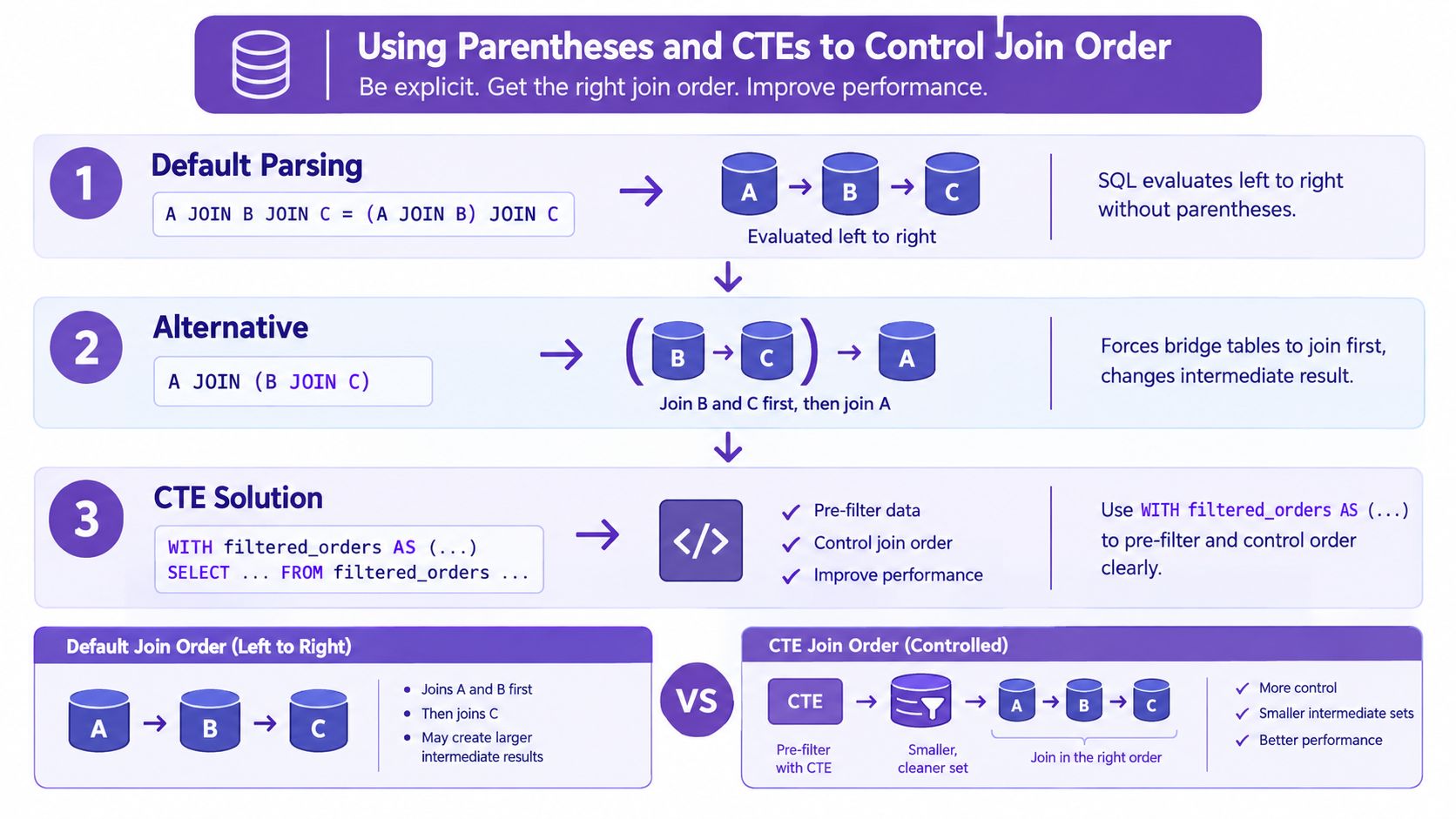
Parentheses and CTEs help when you need to say, very clearly, "join these two tables first, then attach that result to the parent table." That matters most in mixed join queries, especially when your first question is why the row count jumped or why a LEFT JOIN stopped returning customers with no matches.
SELECT c.name, x.order_id, x.product_id
FROM customers c
LEFT JOIN (
  orders o
  INNER JOIN order_items oi
    ON o.order_id = oi.order_id
) x
  ON c.customer_id = x.customer_id;
Read that query in two steps. First, orders joins to order_items, which keeps only orders that have at least one item. Second, that reduced set joins to customers with a LEFT JOIN, so every customer still appears, but only customers with matched orders and items get values in x.
That distinction is easy to miss. If you expected "all customers and all orders, even empty ones," this query does not do that. It creates the order-item pair first, so itemless orders disappear before the customer join happens.
A CTE often makes that behavior easier to review because you can name the intermediate result:
WITH filtered_order_items AS (
  SELECT o.customer_id, o.order_id, oi.product_id
  FROM orders o
  INNER JOIN order_items oi
    ON o.order_id = oi.order_id
)
SELECT c.name, f.order_id, f.product_id
FROM customers c
LEFT JOIN filtered_order_items f
  ON c.customer_id = f.customer_id;
The CTE acts like a saved working table for the duration of the query. That makes one silent failure easier to spot. If filtered_order_items has multiple rows per order, your final result will also have multiple rows per customer-order pair. The multiplication did not happen at the LEFT JOIN. It was already present in the CTE.
Use this pattern when you want to isolate a tricky part of the join, test its row count on its own, and prove the grain before attaching it to the outer query. Teams that standardize those review steps often document them in runbook automation for database tasks.
A quick visual walkthrough helps here:
Once the logic is correct, performance becomes the next complaint. On Amazon RDS or Aurora, start with EXPLAIN and, where supported, EXPLAIN ANALYZE. You're checking whether the engine can use indexes on the join keys and whether the intermediate result set is exploding before filters apply.
Look at the columns used in your ON clauses. If the query joins customers.customer_id to orders.customer_id, and orders.order_id to order_items.order_id, those join keys should be easy for the engine to locate. If they aren't, the database may scan more data than the query shape suggests.
For teams running scheduled resizing around analytics windows, RDS instance resize scheduling can help match capacity to heavier reporting periods.
Use short aliases, keep predicates clear, and test the same query with realistic filters. On RDS and Aurora, the difference between a readable join and a confusing one isn't just style. It affects how quickly someone can inspect a plan and decide whether the problem is logic, indexing, or raw workload shape.
If a three-table join is slow, check these in order:
You write a three-table query, run it, and the numbers look plausible for about ten seconds. Then you notice the row count doubled. Or worse, the LEFT JOIN that was supposed to keep unmatched rows suddenly behaves like an INNER JOIN. Those are the two failure modes developers hit first, and both happen for reasons that are easy to miss in a long query.
The first problem is row multiplication. A three-table join works like following one customer through three spreadsheets. If one customer has many orders, and each order has many order items, the join does not return one customer row. It returns one row per matching combination. That is correct behavior, but it breaks counts and sums when you expected one row per customer.
The second problem is outer join logic getting canceled. A LEFT JOIN keeps rows from the table on the left even when the table on the right has no match. But if you add a filter on the right-side table in the WHERE clause, you remove those NULL matches after the join. The query still runs. It just stops returning the rows you were trying to preserve.
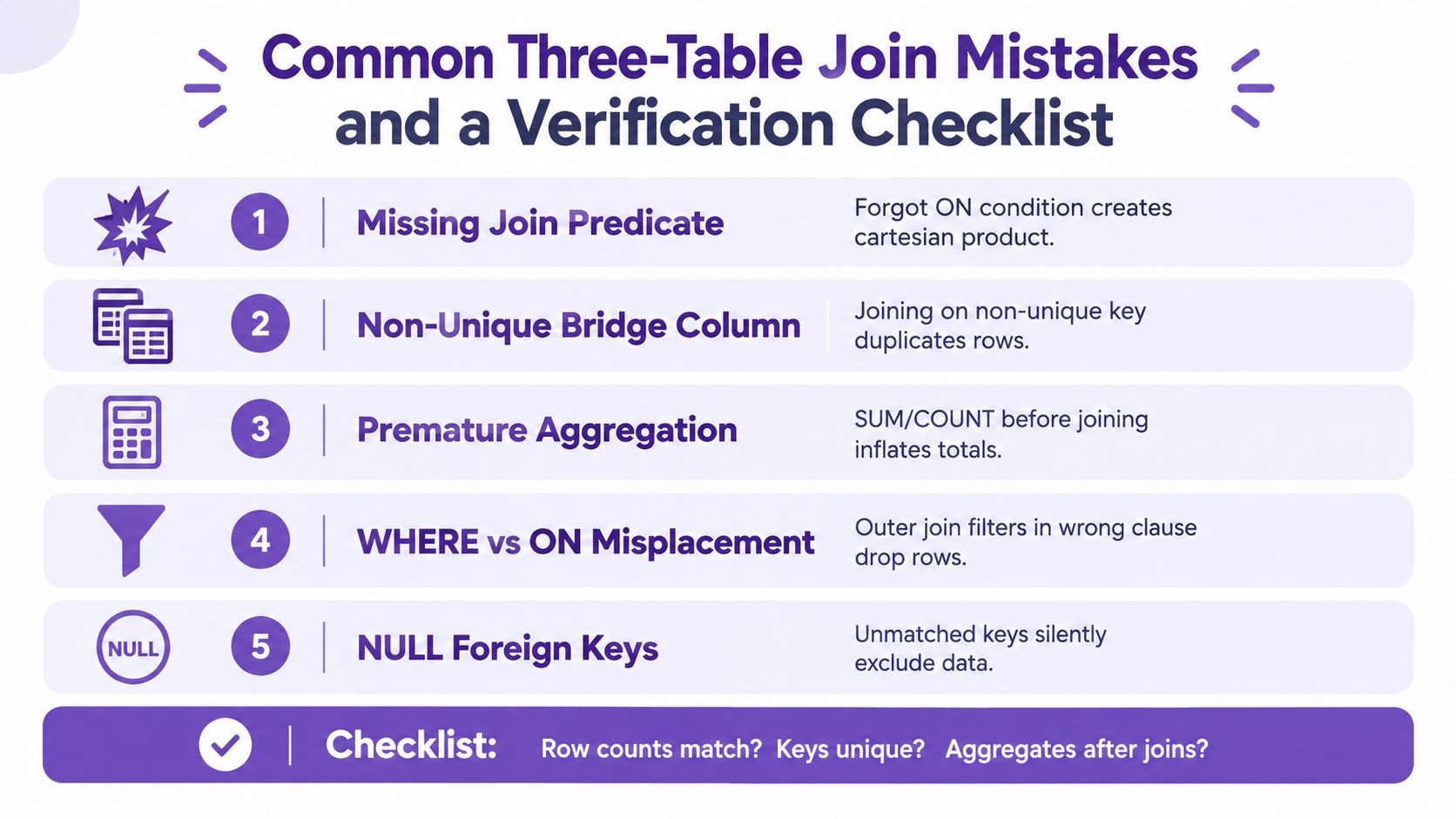
Here are the mistakes behind those symptoms:
LEFT JOINed table in WHERE: this removes unmatched rows and changes the result shape.If your team reviews SQL changes before they reach production, clear change control procedures for database query updates make these mistakes easier to catch early.
GROUP BY join_key HAVING COUNT(*) > 1 on the tables you assume are one-to-one.LEFT JOIN filters carefully. If a condition applies to the optional table, it often belongs in the ON clause, not WHERE.A three-table query is ready to trust only when the join path, the output grain, and the row preservation rules all match your intent.
Compare 10 AWS cost reduction tools for scheduling, rightsizing, and billing analysis. See pricing, savings caveats, pros, cons, and the best use case for each.
Read More →Find the best AWS service for cost optimization with 10 practical tools, native features, trade-offs, and use cases.
Read More →Understand cloud infrastructure cost drivers, measurement methods, and proven optimization strategies. A practical guide to FinOps governance and scheduling.
Read More →