Application Server vs Web Server: The Definitive Guide
When you get down to it, the main difference between an application server vs web server is what they’re built to do. A web server is designed to serve static content—things like HTML pages, images, and stylesheets—over HTTP. An application server is built to run dynamic business logic and power complex, multi-layered applications. I like to think of it like this: a web server is like a restaurant handing you a pre-packaged sandwich, while an application server is the chef in the back, cooking a meal from scratch based on your specific order. Optimizing your server setup starts with knowing what each piece does, which lets you fine-tune everything for better performance and lower costs.
Ready to optimize your server setup and slash your cloud bill? Server Scheduler automates starting and stopping your EC2 and RDS instances, helping you save up to 70% on AWS costs.
Contents
Ready to Slash Your AWS Costs?
Stop paying for idle resources. Server Scheduler automatically turns off your non-production servers when you're not using them.
Defining the Core Roles
To truly grasp the difference between a web server and an application server, it’s essential to examine their specific jobs and how they handle requests. While they often collaborate, their core responsibilities are fundamentally distinct. A web server is primarily the software and hardware that uses HTTP (Hypertext Transfer Protocol) to respond to requests from browsers. Its main function is to deliver static content—pre-existing files stored on the server, ready for immediate dispatch. This includes HTML pages, CSS stylesheets, JavaScript files, images, and documents. In essence, a web server is a specialist in efficient content delivery. It's built to handle a massive volume of simple requests quickly, making it the foundation of almost any website. Prominent examples include Nginx and Apache HTTP Server. For those running a basic blog or a corporate brochure site, a web server is often sufficient. If you use Nginx, it is always a good practice to periodically test your Nginx configuration to ensure optimal performance.
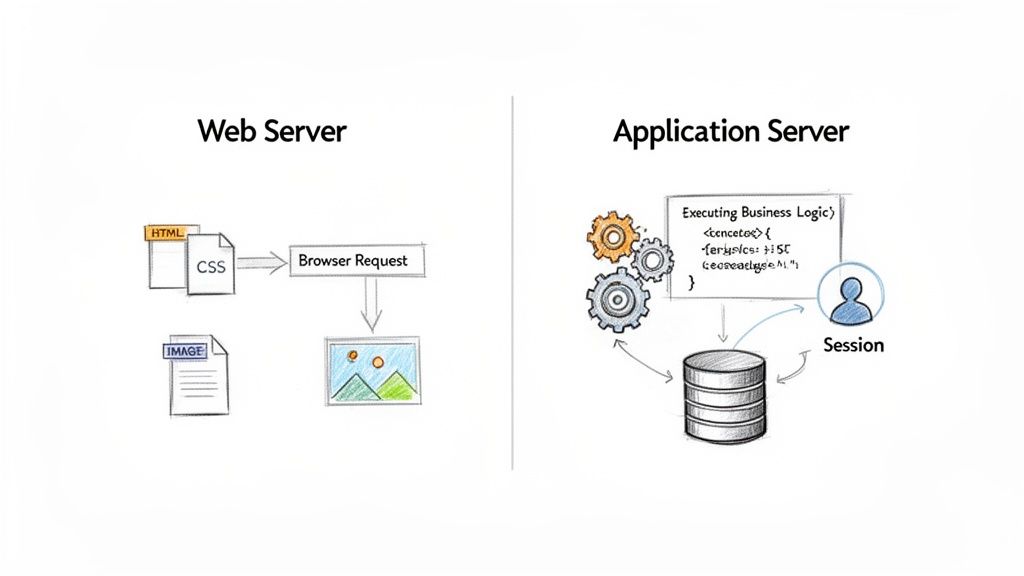
An application server, conversely, is a more robust framework designed to host and execute actual applications. It extends beyond simple file delivery to provide the business logic for dynamic, interactive web apps. It manages all the complex, behind-the-scenes processing, such as communicating with databases, managing user sessions, and handling transactions. It serves as the runtime environment where application code executes, generating dynamic content based on user interactions. Common examples include Apache Tomcat, WildFly, and WebLogic. This capability is absolutely critical for services like e-commerce sites or online banking portals, where content is personalized and constantly changing.
An application server's main function is to act as the middleman between what the user sees on the front-end and all the complex back-end code, including databases and other services.
To quickly summarize these distinctions, the table below provides a high-level comparison of their core differences, focusing on their primary purpose, the type of content they handle, and common examples.
| Aspect | Web Server | Application Server |
|---|---|---|
| Primary Function | Serves static content (HTML, CSS, images) | Executes dynamic business logic |
| Content Type | Static | Dynamic and static |
| Core Protocol | Primarily HTTP/HTTPS | Multiple protocols (HTTP, RPC, RMI) |
| Resource Use | Lightweight and efficient | More resource-intensive |
| Common Examples | Nginx, Apache HTTP Server, IIS | Apache Tomcat, WildFly, WebLogic |
Comparing Server Architectures and Capabilities
To truly understand the "application server vs web server" debate, we must look beyond basic job descriptions and delve into their architectural differences. One of the most significant distinctions is how they communicate. A web server specializes in the language of the web: HTTP and its secure counterpart, HTTPS. It is incredibly efficient at handling requests for static assets like HTML pages, CSS files, and images, delivering them to a user's browser with minimal overhead. In contrast, an application server is a multilingual powerhouse. While it handles HTTP/HTTPS, it also supports a range of other protocols like Remote Method Invocation (RMI) and Remote Procedure Call (RPC), which are crucial for distributed applications where different system components need to communicate directly.
Because their roles are so different, their resource consumption profiles vary significantly. Web servers like Nginx are engineered to be lightweight, with a minimal memory and CPU footprint. Their event-driven, asynchronous design allows them to handle tens of thousands of simultaneous connections for static content without strain. On the other hand, application servers like Tomcat or WildFly are inherently more resource-intensive. They often operate within environments like the Java Virtual Machine (JVM), which requires a substantial amount of memory. The complex tasks they perform—running business logic, managing database connections, and maintaining user sessions—demand considerable CPU and RAM. This resource gap is a primary reason hybrid setups are so prevalent. Placing a lightweight web server in front can offload simple tasks, freeing the application server to focus on dynamic logic. To better understand this front-facing layer, our guide on how to build a proxy server offers valuable insights.
Drilling down into their feature sets makes their distinct roles even clearer. An application server's toolkit is far more extensive, designed to provide a comprehensive environment for enterprise-grade applications.
A key architectural differentiator is state management. Web servers are fundamentally stateless—each request is a brand new event. Application servers are designed to be stateful, capable of managing user sessions and remembering context across multiple requests.
Examining Market Adoption and Deployment Trends
Understanding the technical differences is one thing, but seeing how web and application servers are used in the real world provides a much clearer picture. The web server market demonstrates how efficiency drives dominance. Servers like Nginx and Apache are ubiquitous, powering a vast majority of websites. Their widespread adoption is a direct result of their specialized design for serving static content with minimal resource consumption. Web servers are typically deployed on lean, cost-effective cloud instances, often running a minimal Linux distribution. This model is perfectly suited for horizontal scaling, where traffic spikes are managed by adding more identical, low-cost server instances rather than upgrading to a single, powerful machine. This approach offers significant cost-effectiveness, high availability, and elasticity, aligning perfectly with modern DevOps practices. For teams managing these fleets, using cloud infrastructure automation tools becomes essential.
The application server market, while more specialized, is incredibly valuable. These servers are the backbone of critical enterprise systems, from financial trading platforms to massive e-commerce operations. This is the high-value niche occupied by giants like Apache Tomcat and WildFly. Their deployment environments are completely different. Application servers handle complex business logic and stateful user sessions, making them far more resource-intensive. They often require virtual machines with significant CPU power and large amounts of RAM. This demand for powerful hardware leads to a different scaling strategy where vertical scaling—adding more resources to a single server—is common. As IT landscapes evolve, understanding strategies like data center migration best practices becomes crucial when moving these powerful servers.
Unlike the lean instances used for web servers, application servers often require virtual machines with significant CPU power and large amounts of RAM to accommodate processes like the Java Virtual Machine (JVM).
The table below breaks down the typical deployment profiles of these two server types, highlighting their differing resource needs and scaling strategies.
| Deployment Aspect | Web Server (e.g., Nginx) | Application Server (e.g., Tomcat) |
|---|---|---|
| Typical Instance Type | Low-cost, general-purpose (e.g., AWS t3.micro) | Compute or memory-optimized (e.g., AWS m5.xlarge) |
| Primary Scaling Strategy | Horizontal (adding more instances) | Both horizontal and vertical (adding resources) |
| Resource Profile | Low CPU and memory footprint | High CPU and memory consumption |
| Operating System | Often minimal Linux distributions | Full-featured server operating systems |
How Hybrid Architectures Unlock Peak Performance
When considering the application server vs. web server debate, the optimal solution is rarely "one or the other." Instead, modern, high-performance applications nearly always employ a hybrid architecture that allows both server types to leverage their strengths. The most common and effective model places a web server like Nginx or Apache at the forefront, acting as a reverse proxy for one or more application servers. In this configuration, the web server serves as the public-facing entry point, fielding every request and routing it appropriately. This initial step is critical. The web server efficiently handles what it does best: serving static content. When a browser requests a product image, a CSS file, or a JavaScript library, the web server retrieves it directly, never bothering the application server.
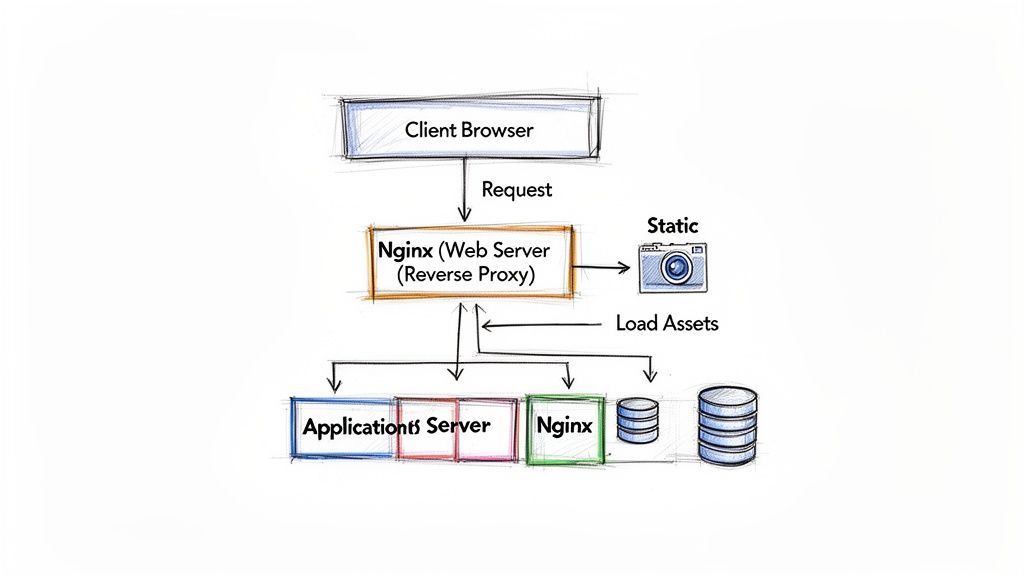
By acting as an intermediary, the web server shields the more complex application servers from direct internet exposure, creating a more robust and manageable system. For example, on an e-commerce site, a web server can handle thousands of static requests for product images and stylesheets with minimal overhead. Only when a user performs a dynamic action, such as adding an item to the cart, is the request forwarded to an application server. This division of labor provides significant advantages in performance, security, and scalability. Offloading static content delivery frees up the application server's resources for executing business logic. Furthermore, the web server can act as a load balancer, distributing dynamic requests across a pool of application servers to prevent bottlenecks and ensure high availability. To optimize this, understanding concepts like How Hash Partitioning Improves Load Balancing can be beneficial. Of course, this critical component has its own costs, which you can learn to manage by reading our guide on AWS load balancer pricing.
The core principle of a hybrid architecture is specialization. Let the web server handle the high volume of simple requests, freeing the application server to manage the low volume of complex, dynamic tasks.
Optimizing Server Costs in Cloud Environments
While technical distinctions are important, the discussion of application server vs. web server inevitably turns to cost, especially in cloud environments like AWS. A significant financial gap exists between these two server types. Web servers, built for efficiency, are naturally less expensive to operate. Open-source options like Nginx and Apache have no licensing fees and can run on lean, affordable instances. Their minimal resource footprint means they can handle substantial traffic without requiring costly high-memory virtual machines.
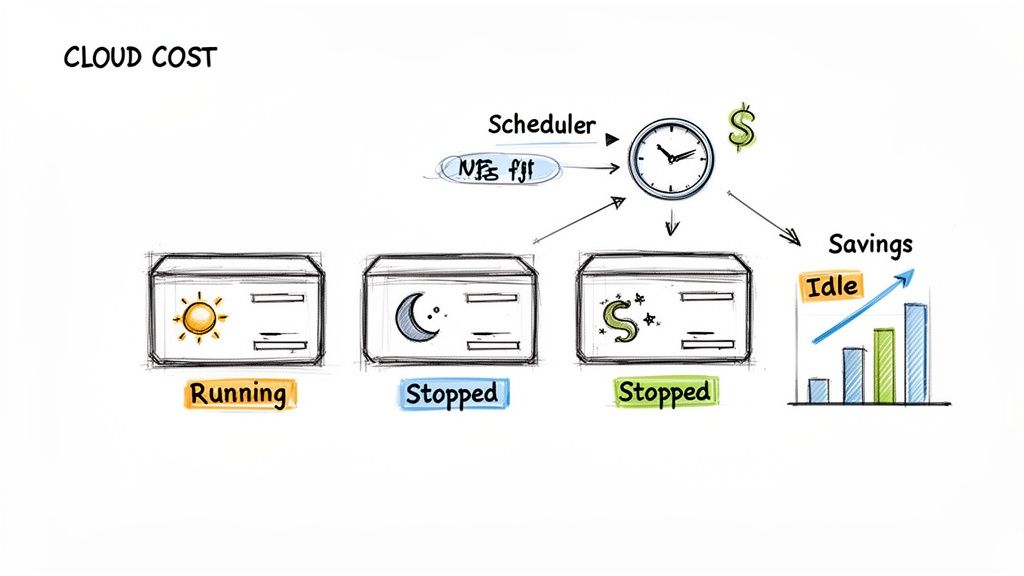 Tomcat are resource-hungry, often requiring more expensive compute-optimized or memory-optimized cloud instances. This cost reality is set against a backdrop of massive growth, with the application server market projected to expand significantly as noted by GrandViewResearch.com. One of the largest, yet often overlooked, sources of cloud waste comes from non-production environments. Development, staging, and QA servers are essential but rarely need to run 24/7. These resources often run continuously, yet are only used during business hours, meaning over 75% of the spending on them could be pure waste.
For many companies, non-production environments are a huge slice of the cloud bill. These resources often run around the clock—730 hours per month—when they’re only being used for about 176 hours (40 hours a week). That means over 75% of what you're spending on those servers could be pure waste.
A smart, automated cost-saving strategy is essential. By setting up automated start/stop schedules for these instances, you can align cloud spending with actual usage. This is a practical and highly effective way to reduce your cloud bill, often slashing the cost of non-production environments by 60-70%. For a deeper dive, explore our full guide on EC2 cost optimization strategies.
Choosing the Right Server for Your Project
The decision in the "application server vs. web server" dilemma ultimately hinges on your project's specific needs. For simple projects focused on serving content that doesn't change—such as brochure websites, personal blogs, or landing pages—a standalone web server is the ideal choice. The content is pre-built and only needs to be delivered. A web server like Nginx or Apache excels here, offering a lightweight, fast, and cost-effective solution.
However, if your project requires interaction, data processing, and dynamic content generation—such as an e-commerce site or an online banking portal—an application server is non-negotiable. It provides the necessary environment to run business logic, manage database connections, handle user sessions, and ensure transactional integrity. These are essential services that a simple web server cannot provide. For most modern web applications, the industry standard is a hybrid model that combines both, with a web server acting as a reverse proxy in front of an application server. Hosted application servers now dominate 75% of the market, according to this application server market analysis, reflecting this trend.
The Decision Checklist
Use these questions to steer your choice. If you answer "yes" to any of the first three, a hybrid or application-server-focused model is probably where you need to be.
- Does your application need to execute business logic? (e.g., process orders, manage user data)
- Will your application interact with a database to generate content?
- Do you require features like transaction management or database connection pooling?
- Is your project primarily serving pre-built static files like HTML and images? (A "yes" here points straight to a standalone web server).
Frequently Asked Questions
To wrap up, let's address some common questions about web servers versus application servers. This decision tree provides a visual guide to help clarify which architecture fits your project.
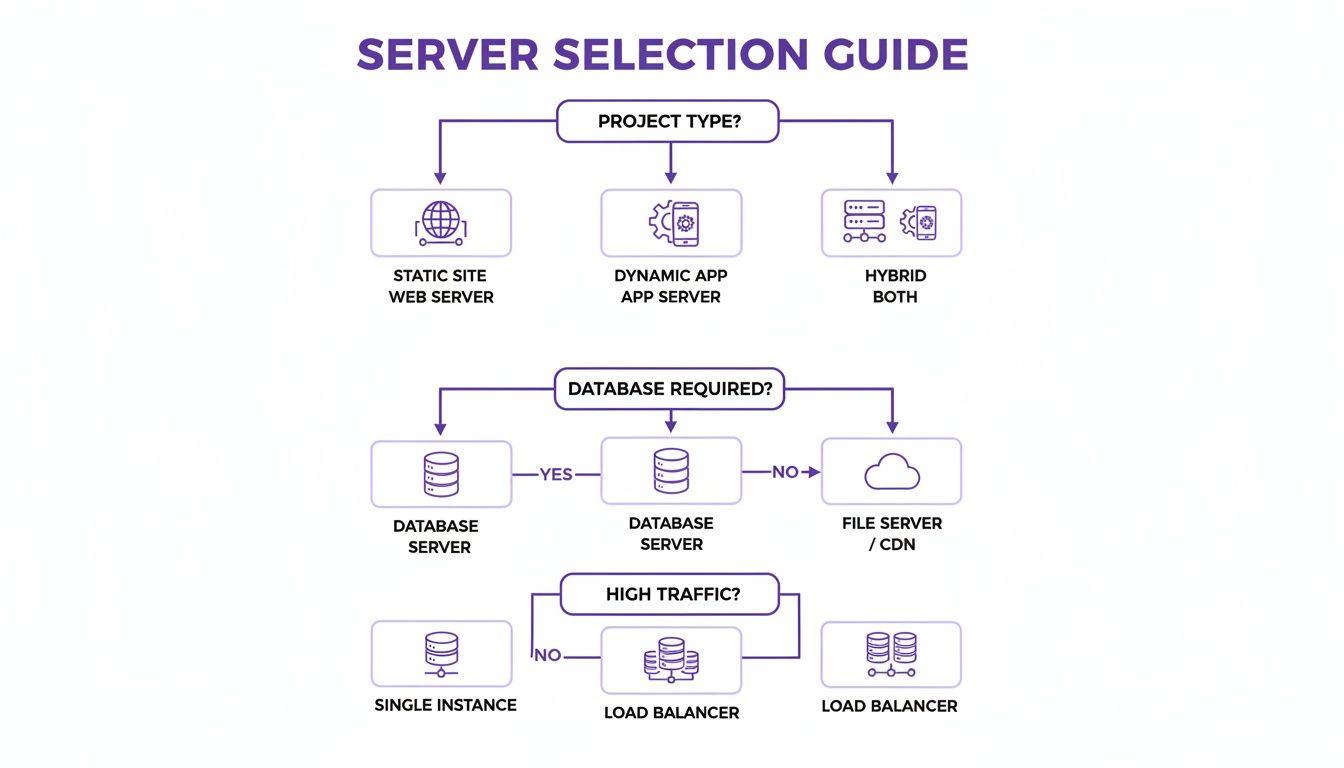 Apache can handle simple dynamic content through add-on modules, but it lacks the sophisticated features of a true application server, such as transaction management or database connection pooling. For complex tasks, this can lead to performance bottlenecks. You don't always need both; a simple static site runs perfectly on just a web server. However, most modern interactive applications benefit from a hybrid approach. Docker and other container technologies fit well into this architecture, allowing you to package your Nginx web server and Tomcat application server in separate containers. This simplifies deployment, management, and independent scaling of each component.
Ready to stop wasting money on idle cloud resources? Server Scheduler automates the start/stop schedules for your EC2 instances, helping you cut your AWS bill by up to 70% by eliminating waste during off-hours. Learn more and get started at https://serverscheduler.com.